
TL;DR
- Working with AI coding agents is reading walls of text. I am a visual person. I wanted the whiteboard back.
- I created a diagram with visual and metadata on every shape, my own little vocabulary instead of UML.
- A
stateproperty (current vs. future) turned the diagram into an alignment artifact and surfaced real architecture debt. - I taught the diagram to move and talk and ended up with a nice video.
Remember the movie Matrix and this scene?

This is how I have felt since I started building firmd. Walls. Of. Text. Cypher tells Neo he doesn't even see the code anymore… I wish I had that plug in the back of my neck to stream it all straight into my brain. Well, careful what you wish for.
My engineering agents chat like their counterpart is another LLM. The information density in their responses is high. This is the downside of a high signal-to-noise ratio: I am a human, I want a little noise to enjoy the signal. And then there is the sheer volume. Sometimes it feels like a new kind of doomscrolling, watching text roll up my screen with a little FOMO. What was that? Was that the one line I skimmed that turns into an architectural crack three prompts later?
When I ran an architecture audit recently, my auditors produced findings by the thousands of lines. I asked for a human-friendly version and I got one. It was twice as long. But it was an architecture audit, so I had to bite the bullet...
I am a visual person. I love whiteboards, sketches, boxes and arrows. My best alignment moments with human teams happened standing in front of a drawing. So I started wondering whether I could shift the whole conversation and talk to my agents in pictures.
Agents read screenshots well, that is nothing new. But an architecture diagram used to align on hard technical topics is a different test than a UI screenshot where we argue about colors, pixels and moving shapes around (not that that is trivial either; it is a different problem). Architecture diagrams demand precision about semantics. Move one arrow from one box to another and you change the meaning of the system. Reverse the direction of an arrow and you might trigger a massive refactoring of a module. These are key moments in human teams in front of a whiteboard, when someone asks "what if?", picks up the marker (or better, the eraser!), makes a tiny change, and after a few seconds of silence and a couple of "aha" everyone knows what to do (and signs up for a quarter of refactoring).
I wanted that experience back.
Making the diagram my thinking surface
I went to draw.io, a good old friend I keep coming back to in my career. I drew firmd's architecture, the system as I believed it to be and the one as I intended it to be, and handed the agent the raw XML through draw.io's GitHub integration.
After a bit of back-and-forth (yes, connectors need to truly connect shapes, not just visually touch them :)), we fell into the most productive architecture dialogue I have had with an agent so far. The agent read my diagram and told me, box by box, where my picture deviated from the actual code. It was not perfect, but a very promising start. If only I knew where this is going to end…
One rule I set for myself, to avoid shooting my own foot too early: I was the only painter. I never asked the agent to draw. That would have spoiled the experience too early. I keep this as a level-up for later. For now, the agent stayed in its text-spitting comfort zone, I stayed in mine, answering in shapes and arrows.
A picture needs a language
A diagram is enough for two humans pointing at a screen, because we fill the gaps with shared context. An LLM does not have that context, and a box is just a box (or its xml representation). To have a real conversation, the picture needed more semantics. Or, to use AI slop: A contract ;)
draw.io lets you attach arbitrary properties to any shape or edge. So I started tagging. kind to say whether something is a service, a datastore, a queue, an external system. layer to place it in the architecture at platform vs tenant layer. Then type, scope, owner, and a few more as the vocabulary grew. I could have adopted a standardized language here, UML, or ArchiMate, or the C4 model, and maybe longer term that would be a good thing to do. But I felt too constrained at this point and wanted my own dialect, small and shaped exactly to how I think about firmd. It worked better immediately. The agent stopped guessing what a box was, the reasoning was faster (tokens!) and the conversation more meaningful.
But, in the end, I am talking to a language model! Structured tags only get you so far, and I wanted to exploit an LLM‘s strength. So I added prose, a purpose property: plain text on important shapes describing what it is actually there for. That field improved the quality of the dialogue again one level up. The agent could now reconcile my words about a component against the code of that component, and tell me where they disagreed.
Current vs. future vs WTF: the diagram starts to surface misalignment
The property that added a new spin was state, with two values: current and future. current is not a fact, it is my expectation, my belief that this is how the system works today. future is intent, where I want it to go.
Once every shape and arrow carried that distinction (implicitly, what I did not tag as future is my expectation of status quo), the agents started arguing back. I began detecting misalignment I had never seen in the coding sessions. Boxes I believed were connected were not. An arrow pointed one way when the code pointed the other. Why is this box nested inside that one? Why does this dependency exist at all? The picture made the questions concrete.
That is how I found real architecture debt. Somewhere along the way I had skipped challenging a few PRs and drilling into some larger changes, sticking to the natural-language-only interface I deliberately use to build firmd. That kind of defect hides comfortably in prose. The picture made the inconsistency obvious and helped me plan the fixes.
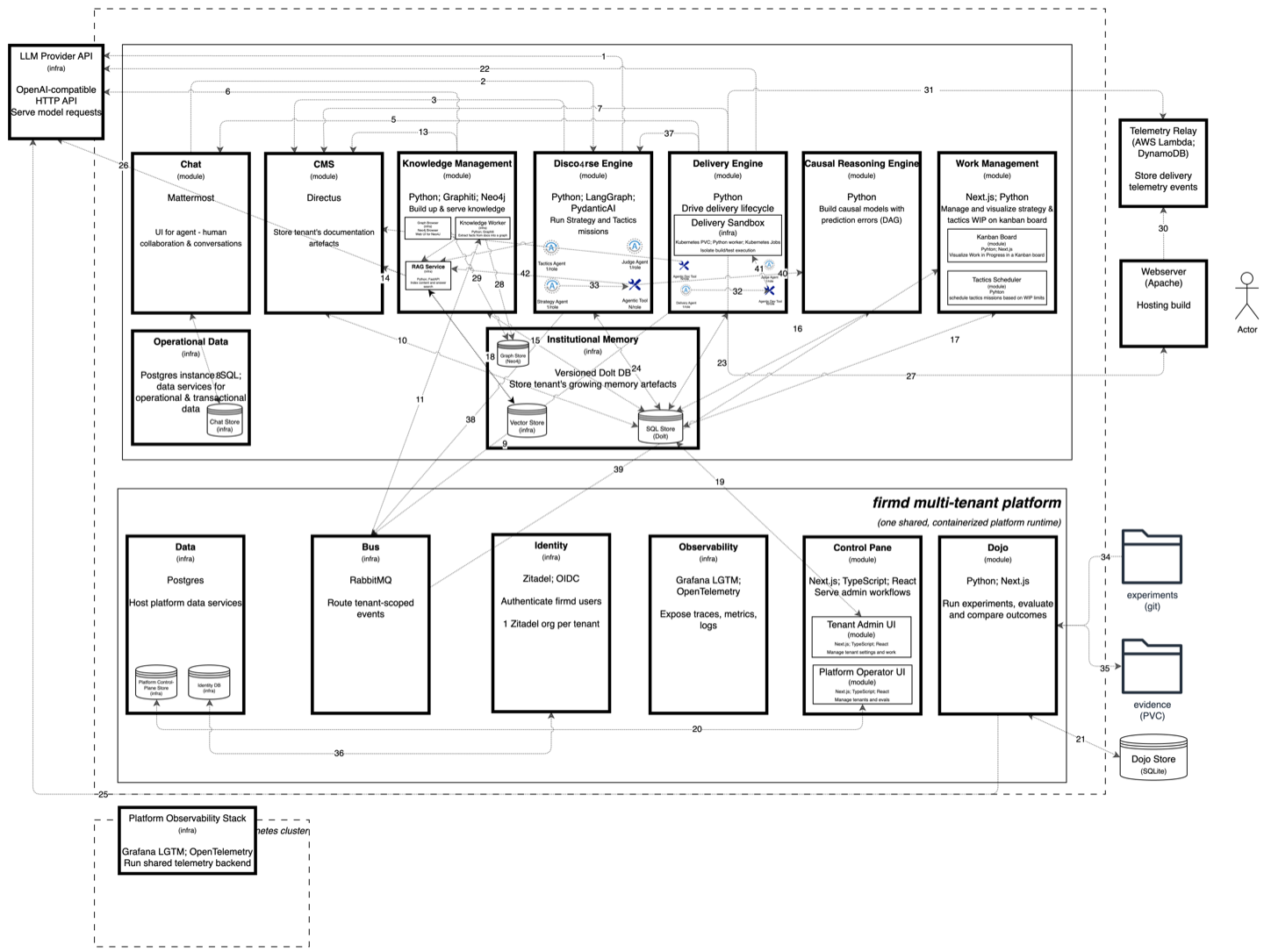
So far, two lessons. First, visual language works with agents today, for me. It’s not perfect, but promising. As long as the diagram carries clear semantics and stays friendly to the human (e.g. flexibility when I need it). Those two requirements pull against each other in many tools, and draw.io convinced me again.
Second, the diagram earns its keep the same way it does in a human org: in the meeting where two people point at the same box and discover they mean different things by it. That is exactly what the Visual + XML gave me and my agents. One shared artifact we could both point at.
Teaching the diagram time
A static picture explains structure. It does not explain flow, the sequence of things that happen when firmd runs a mission. I wanted a sequence diagram's story without a sequence diagram's separate notation. Same model, one source of truth, different perspectives.
So I reused the metadata trick: numbered tags on the shapes consecutively representing steps in a flow, and the edges that participate in a step. It captured the flow correctly, but I could not visualize it nicely. A diagram lit up with numbers is still a wall, just a numbered one.
But since vibe-coding helper tools is so much fun these days, I built flowcus. It takes the draw.io diagram (xml) and turns it into a chapter-focused walkthrough: it zooms into the shapes for the current step, animates the relevant edges, shows the prose for that chapter, and can render the whole thing to a mp4 video. Annotations (text, images, even video) drop in at time/x/y coordinates over the diagram. All in one single source of truth. Instead of showing the entire architecture at once and drowning the viewer, flowcus tells the story and lets the viewer focus on the flow. I love naming things ;)
Real footage: reeco
One step led to the next. I wanted more. Zooming around a diagram is nice, but a technical walkthrough also benefits from showing the real product on screen. I needed screenshots and video of firmd actually doing its work. So I built a second tool, reeco, my screen recorder.
reeco records an end-to-end firmd mission through a real Chrome window with Playwright: it logs into the tenant's chat system, types the seed message with visible keystrokes, watches the agent discourse unfold, opens the causal model, follows the tactics channel through build and deployment, and lands on the live shipped product increment. Alongside the MP4 it keeps a transcript with exact timestamps synced to the video.
That transcript is the clever bit. I feed it to an AI and ask it to find the highlights, the wow moments in a ten-minute run. (Remember: I am using lower tier models that not always shine in their reasoning;))
Using the exact timestamps reeco then cuts those moments into clips and, with a lot of help from ffmpeg (ffmpeg is awesome!!), pans, zooms and sweeps a highlight marker across the exact words on screen. The whole highlight video production is scriptable and one prompt, in short „get me three 10s highlight videos with annotations“.
The cherry on top
The clips became annotations inside flowcus, layered over the diagram at the right moment in the story. And then, for the cherry on the cake: I dropped the talk track into synthesia.io and let an AI avatar present it. A presenter walking a viewer through firmd's technical architecture and flow, narrating the diagram I drew, turned into a flow video with flowcus, with integrated footage captured by reeco. (Admittedly, syncing the avatar talking speed with the video was a finicky task…)
What started as a grumpy "I want less wall of text" ended as a narrated video demo of firmd's architecture. Here is the result.
Meet Julian, firmd's first external hire:
I hope you enjoy watching the video as much as I enjoyed making it.